Generate Valid JSON-LD Schema in Seconds
Select a schema type, fill in the fields, and copy ready-to-use JSON-LD markup. Paste it into your page's <head> section or use your SEO plugin's schema field.
Paste inside a <script type=”application/ld+json”> tag in your <head>, or use Rank Math / Yoast's schema field. Validate at validator.schema.org · serptop.pro
TL;DR
- Schema markup doesn't boost rankings directly. It determines whether Google shows your result as a plain link or a rich result with author, date, FAQ, and breadcrumbs.
- JSON-LD is the only format worth using in 2026. It lives in
<head>, separate from your content, and every major CMS plugin supports it natively. dateModifiedis a freshness signal, not decoration. Update it every time you make meaningful changes to a page.- AI Overviews and AI Mode extract structured facts from pages with valid schema. No markup means someone else gets cited instead of you.
- Valid schema takes two minutes with a generator. Invalid schema takes two minutes and a trip to the Rich Results Test to catch.
Most pages never get rich results. Not because the content is bad. Because the markup is missing – or broken in a way Google quietly ignores.
I've audited hundreds of sites over the years. The pattern is always the same: solid content, decent backlinks, zero structured data. No author attribution. No breadcrumb trail in the SERP. No FAQ block. Just a plain blue link competing against pages that figured out the formatting.
Schema markup is that formatting. And once you understand what it actually does, you stop treating it as optional.
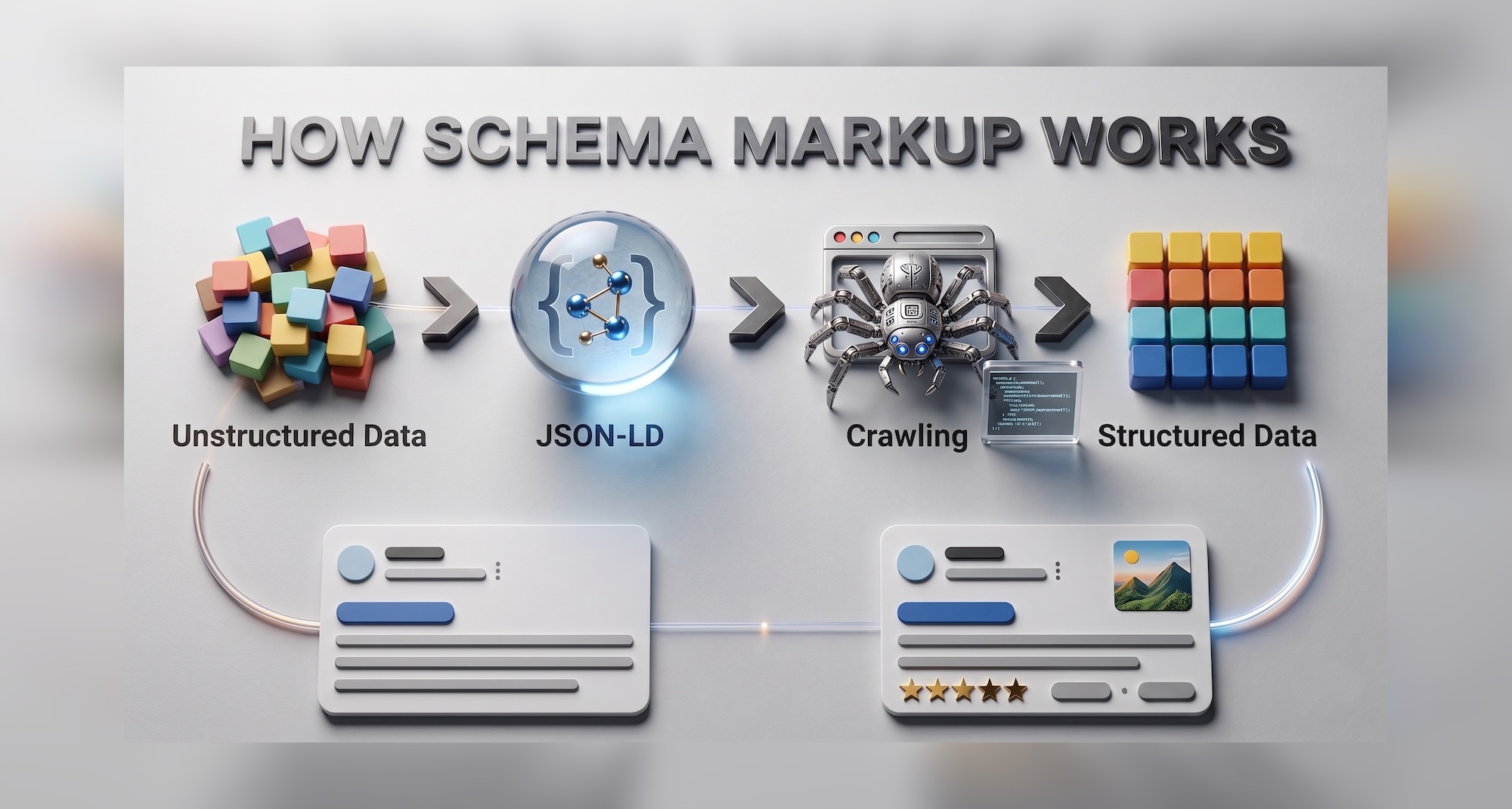
How Schema Markup Works
Think of it like a form versus a free-text document. You can write your CV as a wall of text – a recruiter will read it and figure it out. Or you can fill in a structured form where every field is labeled: name, experience, education. The form is faster to process. Nothing gets misinterpreted.
Schema markup is that form, but for search engines.
Without schema, Googlebot reads your HTML and makes educated guesses. It sees a date and assumes it might be a publication date. It sees a name near the top of the page and guesses it might be the author. It sees a list of questions and hopes they're FAQs. Guesses are fine. Certainty is better.
Here's how it works in practice, step by step.
Step 1: You add a JSON-LD block to your page's <head>. It's invisible to users – a structured data script that only bots read. It declares exactly what kind of page this is, who wrote it, when it was published, and what it contains.
Step 2: Googlebot reads the block during crawl. It doesn't guess anymore. It knows: @type: Article, author: Maiia Artemenko, datePublished: 2026-04-03. Structured, machine-readable, unambiguous.
Step 3: Google parses the data and decides what to do with it. Valid schema that matches the visible page content goes into Google's index with enriched signals. If the page qualifies, Google renders a rich result – with author name, date, star rating, FAQ block, or breadcrumb trail, depending on the schema type.
Step 4: The rich result appears in search. More space, more context, more clicks – or a citation in an AI Overview, which is increasingly where the real traffic decision gets made.
That's the full chain. The JSON-LD block you generate with this tool is the input to step one. Everything else follows automatically – as long as the markup is valid and matches what's on the page.
What Schema Markup Actually Does
Here's the honest answer: schema doesn't improve your rankings directly. Google has said this clearly, and I believe them. What it does is give you a shot at rich results – the expanded snippets that take up more real estate, pull more eyes, and consistently outperform plain links on click-through rate.
But there's something less talked about. Schema helps Google understand your page without ambiguity. When Googlebot crawls your article, it sees HTML – text, headings, images. It makes educated guesses about what things mean. Schema removes the guesswork. You're telling Google: this is the author, this is the publication date, this is the FAQ section.
In 2026, that precision matters more than it ever did.
AI Overviews now appear for roughly a quarter of all Google searches in the US. AI Mode, launched in May 2025, replaces the traditional ten blue links with a generated answer entirely. In both cases, Google's AI layer needs to understand your page fast and accurately. Pages with clean structured data get cited. Pages without it get summarized into someone else's answer.
That's the real reason to care about schema right now – not the rich snippet, but the citation layer above it.
JSON-LD: The Only Format Worth Using
There are three ways to add schema to a page: JSON-LD, Microdata, and RDFa. Google supports all three. Google recommends JSON-LD.
I use JSON-LD exclusively, and so should you. It lives in a <script> block in <head> – completely separate from your visible content. You can update it without touching your HTML. You can validate it without digging through markup. It's clean, portable, and what every major CMS plugin generates by default.
The others are legacy approaches. Move on.
The Six Schema Types This Tool Generates
Article
Article schema is the baseline for any editorial page – blog posts, guides, news articles, tool pages like this one.
The minimum required fields are @type, headline, author, and datePublished. But the recommended set does more work. dateModified is a freshness signal – Google uses it to assess how current your content is. image is required for image-rich results eligibility. publisher with a logo URL completes the E-E-A-T picture and ties author identity to an organization.
Here's what a real Article schema looks like, filled with actual data from this page:
{
  "@context": "https://schema.org",
  "@type": "Article",
  "headline": "Schema Markup Generator – Article, FAQ, BreadcrumbList",
  "author": {
    "@type": "Person",
    "name": "Maiia Artemenko",
    "url": "https://serptop.pro/maiia-artemenko/"
  },
  "publisher": {
    "@type": "Organization",
    "name": "SerpTop.pro"
  },
  "image": "https://admin.serptop.pro/wp-content/uploads/2026/04/schema-markup-generator-1.jpeg",
  "datePublished": "2026-04-03T00:00:00+00:00",
  "dateModified": "2026-04-26T00:00:00+00:00"
}
That dateModified field – today's date. Not cosmetic. Every time I substantially update a page, I update that field. It's one of the lowest-effort freshness signals available, and most people skip it entirely.
The author url field also matters more than it used to. Google's systems cross-reference author URLs with existing Knowledge Graph entities. If your author page exists, is indexed, and links to your social profiles and other publications, you're building a verifiable identity – which feeds directly into how Google assesses E-E-A-T for your content.
FAQ
FAQPage schema lets your questions and answers appear directly in search results, expanded beneath your listing. When it fires, it takes up significant space and makes your result hard to scroll past.
When does it fire? Less often than it used to. Google scaled back FAQ rich results for many site categories in late 2023 – the official explanation was overuse and low-quality implementations. In 2024, eligibility was tightened further toward high-authority publishers. Government sites, established brands, and well-indexed editorial sites see it most reliably.
That said: worth adding. When it shows, the SERP impact is real.
The structure is clean:
{
  "@context": "https://schema.org",
  "@type": "FAQPage",
  "mainEntity": [
    {
      "@type": "Question",
      "name": "Does schema markup directly improve rankings?",
      "acceptedAnswer": {
        "@type": "Answer",
        "text": "No. Schema doesn't change where you rank. It changes how your result looks in the SERP and whether you're eligible for rich results like FAQ blocks, article cards, and breadcrumb trails."
      }
    }
  ]
}
One practical note: multiple schema types on one page are fine and often recommended. Article + FAQPage is a common combination. Use separate <script type="application/ld+json"> blocks – one per type. Don't try to merge incompatible types into a single block.
BreadcrumbList
Breadcrumbs replace the raw URL in your search result with a readable path. Instead of serptop.pro/schema-markup-generator/, Google displays SerpTop.pro › Tools › Schema Markup Generator.
It looks cleaner. It communicates site structure at a glance. And it tends to lift CTR on navigational and category queries, because users can tell where they're landing before they click.
{
  "@context": "https://schema.org",
  "@type": "BreadcrumbList",
  "itemListElement": [
    {
      "@type": "ListItem",
      "position": 1,
      "name": "Home",
      "item": "https://serptop.pro/"
    },
    {
      "@type": "ListItem",
      "position": 2,
      "name": "Tools",
      "item": "https://serptop.pro/tools/"
    },
    {
      "@type": "ListItem",
      "position": 3,
      "name": "Schema Markup Generator",
      "item": "https://serptop.pro/schema-markup-generator/"
    }
  ]
}
The most common mistake: the URLs in BreadcrumbList don't match the actual site structure. Google will flag this. If your site doesn't have a /tools/ category page, don't include it in the chain. The schema must reflect what actually exists.
BlogPosting
BlogPosting is a subtype of Article – same fields, same structure, narrower semantic meaning. Use it when the page is genuinely a blog post: personal, informal, dated, with a single clear author. Use Article for editorial content that sits closer to journalism or reference material.
In practice, Google treats them nearly identically for rich result eligibility. The distinction matters more for Knowledge Graph parsing and AI citation layers, which increasingly use @type to categorize content by format. If you run a personal blog, BlogPosting is the more accurate signal.
{
  "@context": "https://schema.org",
  "@type": "BlogPosting",
  "headline": "How I Fixed 14 Schema Errors in One Audit",
  "author": {
    "@type": "Person",
    "name": "Maiia Artemenko",
    "url": "https://serptop.pro/maiia-artemenko/"
  },
  "publisher": {
    "@type": "Organization",
    "name": "SerpTop.pro"
  },
  "datePublished": "2026-04-03T00:00:00+00:00",
  "dateModified": "2026-04-26T00:00:00+00:00"
}
NewsArticle
NewsArticle is for time-sensitive reporting – news stories, press coverage, breaking updates. Google News and Discover both use this type to identify content eligible for those surfaces. If your site publishes news content and you want Discover traffic, this is the type to use.
The key difference from Article: datePublished carries more weight here. Freshness is the primary signal for news content. An outdated datePublished on a NewsArticle can suppress it from news surfaces entirely, even if the content is accurate.
Don't use NewsArticle for evergreen guides or tool pages. Semantic accuracy matters – mislabeling content type is a signal mismatch Google does notice.
{
  "@context": "https://schema.org",
  "@type": "NewsArticle",
  "headline": "Google Updates FAQ Rich Result Eligibility for 2026",
  "author": {
    "@type": "Person",
    "name": "Maiia Artemenko"
  },
  "publisher": {
    "@type": "Organization",
    "name": "SerpTop.pro"
  },
  "datePublished": "2026-04-26T00:00:00+00:00",
  "dateModified": "2026-04-26T00:00:00+00:00",
  "image": "https://serptop.pro/wp-content/uploads/2026/04/news-image.jpeg"
}
Product
Product schema is the most conversion-relevant type in this set. When implemented correctly, it enables rich results with price, availability, rating, and review count displayed directly in the SERP – before the user clicks.
The field that most people underestimate is aggregateRating. A star rating next to your result in a competitive SERP is a click magnet. But Google requires that ratings come from actual user reviews on your page – fabricated ratings are a manual action waiting to happen.
availability is equally important for e-commerce: InStock, OutOfStock, or PreOrder. Google uses this for Shopping surfaces and increasingly for AI answers that include purchase intent.
{
  "@context": "https://schema.org",
  "@type": "Product",
  "name": "SerpTop Pro Plan",
  "brand": {
    "@type": "Brand",
    "name": "SerpTop"
  },
  "description": "SEO tools and schema generators for digital marketers.",
  "offers": {
    "@type": "Offer",
    "price": "29.99",
    "priceCurrency": "USD",
    "availability": "https://schema.org/InStock"
  },
  "aggregateRating": {
    "@type": "AggregateRating",
    "ratingValue": "4.8",
    "reviewCount": "124"
  }
}
A Real Example: Using the Generator on This Page
Rather than explaining the tool abstractly, here's exactly what I did.
I opened the Schema Markup Generator, selected Article, and filled in the fields for this page – headline, author name and URL, publisher name, featured image URL, and both date fields.
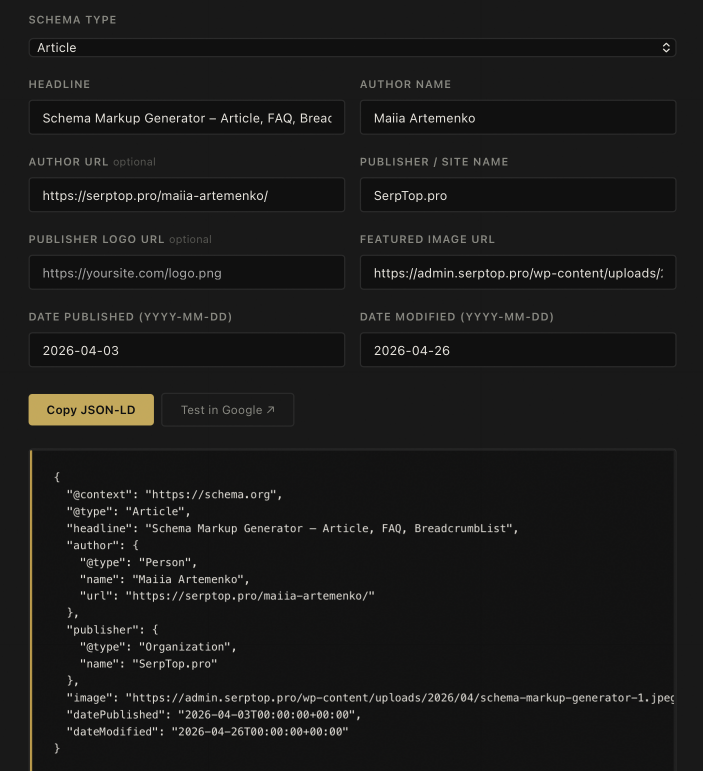
The generator output the complete JSON-LD block instantly. No manual formatting. No hunting for the ISO date syntax. No forgetting @context.
Then I used both buttons. Copy JSON-LD puts the full <script> block on my clipboard. Test in Google opens Google's Rich Results Test in a new tab. I switched to the Code tab, pasted, and ran the test.
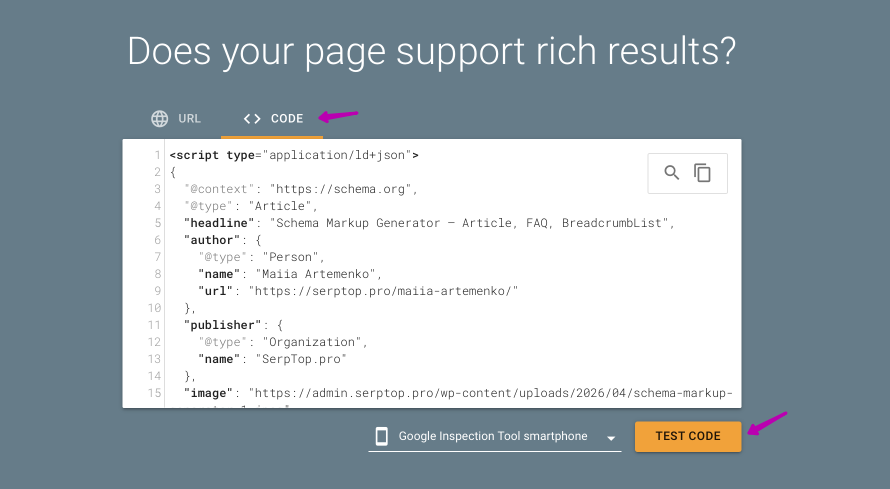
The test confirmed the markup is valid and detects an Article rich result.
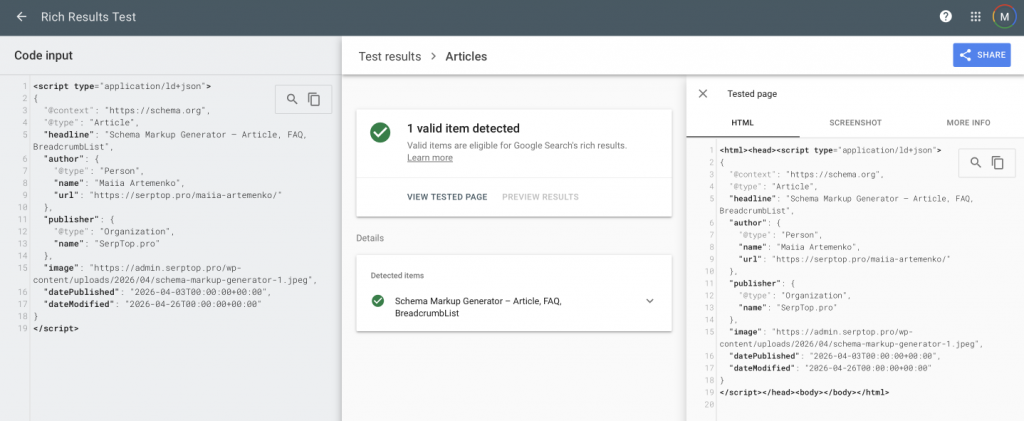
Full loop: fill in fields, get JSON-LD, confirm it's correct – under two minutes.
What do you do with the validated code? Paste it into <head> directly, or add it via your CMS. In WordPress: Yoast SEO's Schema tab, RankMath's schema module, a Custom HTML block, or a plugin like Insert Headers and Footers. The output is standard JSON-LD – it works everywhere.
Mistakes That Break Schema
Mismatch between markup and visible content. The most penalized error. If your Article schema lists an author but the page has no visible byline, Google sees a discrepancy and may ignore the markup entirely – or surface a manual action for structured data misuse. Schema must reflect what's actually on the page.
Wrong date format. Google requires ISO 8601: 2026-04-26T00:00:00+00:00. Not April 26, 2026. Not 04/26/26. The generator handles this automatically. If you're ever writing schema by hand, don't guess the format.
Missing @context. Every schema block needs "@context": "https://schema.org". Without it, the entire block is invalid. Obvious in retrospect. Easy to forget.
Stacking types incorrectly. Article + BreadcrumbList on one page is correct and recommended. But two @type values inside a single JSON-LD block will break the parser. Use separate <script> blocks – one per type.
Updating dateModified without updating content. Some people set a cron job to refresh this field daily hoping to signal freshness. Google's systems are good at detecting this pattern. Update the date when you update the page. Not before.
Schema, AI Overviews, and What's Actually Changing
This section didn't exist in most schema guides written before 2024. It should.
Google's AI Overviews pull structured facts from pages when generating summaries. The pages that get cited are not always the ones ranking in position one. They're the ones Google can parse accurately and attribute correctly – meaning verified authorship, valid schema, accurate dates, and content that matches its markup.
AI Mode goes further. It generates answers without traditional organic results. Getting cited in AI Mode isn't about ranking – it's about being parseable, trustworthy, and structured. Schema is a core part of that signal set.
This is what GEO – generative engine optimization – actually means in practice. It's not a separate discipline from technical SEO. It's technical SEO with a sharper focus on machine readability and verified identity. Schema sits at the center of both.
The investment is small. A few minutes per page. The compound effect over months is real.
FAQ
Does schema markup directly improve my Google rankings? No – and anyone telling you otherwise is oversimplifying. Schema improves eligibility for rich results, which can increase click-through rate significantly. Higher CTR can indirectly influence rankings over time, but schema itself is not a ranking factor.
Is JSON-LD the right format to use? Yes. Google recommends JSON-LD over Microdata and RDFa. It's easier to implement, easier to maintain, and doesn't require touching your page's visible HTML. Every major WordPress SEO plugin generates JSON-LD natively.
Where do I add the JSON-LD code in WordPress? The cleanest options are Yoast SEO's Schema tab, RankMath's schema module, or a Custom HTML block in the block editor. You can also use a plugin like Insert Headers and Footers to add it globally. Avoid functions.php unless you're comfortable with PHP and know what you're doing.
How often should I update dateModified? Every time you make a meaningful content change – a new section, updated data, corrected claims. Not for fixing a typo. Don't update it on a schedule without changing the content. Google's freshness signals are more sophisticated than they look.
Does FAQ schema still show in search results in 2026? Yes, but less frequently than in 2022–2023. Google tightened eligibility in late 2023 and refined it further in 2024. High-authority sites and established publishers still see it triggered consistently. For newer or lower-DR sites, it shows occasionally. Still worth adding – when it fires, the visibility gain is real.
Can I combine multiple schema types on one page? Yes, and for most pages you should. Article + BreadcrumbList is the standard combination for editorial content. Article + FAQPage works for pages with real question-and-answer sections. Use separate <script type="application/ld+json"> blocks for each type. Don't try to merge them.
Use the Schema Markup Generator above to generate your JSON-LD in under two minutes. For FAQ schema specifically, the FAQ Schema Builder handles multiple question/answer pairs with a dedicated interface.